DWG for working drawings
DWG is compact and can retain layers, blocks, layouts and application-specific CAD objects. Exchange quality depends on version, fonts, xrefs and proxy objects, so include a controlled PDF when exact layout and notes matter.

CAD & ENGINEERING DATA
A practical comparison of four common CAD formats for drawing review, quotation and manufacturing communication.
DWG is compact and can retain layers, blocks, layouts and application-specific CAD objects. Exchange quality depends on version, fonts, xrefs and proxy objects, so include a controlled PDF when exact layout and notes matter.
DXF exchanges 2D profiles, layers, dimensions and text. Rendering depends on export settings, DXF version, fonts and entity types.
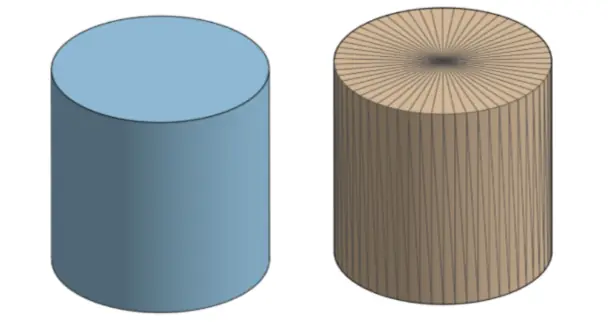
STEP carries solid geometry more accurately than a mesh and is a strong neutral exchange format. Include a controlled 2D drawing for tolerances, finishes, heat treatment and inspection requirements.
STL represents a part with triangles, stores no units or exact CAD features, and should be treated as approximate for measurement.
Use a controlled 2D PDF/DXF and matching STEP/STP model. Identify units, revision and the governing file.
FAQ
It may support initial review, but include 2D requirements when applicable.
No. STL is a unitless triangulated approximation.
CAD & ENGINEERING DATA